使用office365账号登录企业WEB
企业邮箱用的office365,为了统一管理员工账号,以office365账号为主账号,其它应用接入office365账号登录,单点登录简而言之,就是让用户使用一套ID和密码,就可以登录一个或多个系统的授权机制。用户只需要通过其中一个应用的安全认证之后,再访问同一服务器其他应用的资源时不需要再次输入账户和密码。
使用Azure Active Directory 的单点登入进入您客制化的应用程序,使用office365邮箱账号登录企业WEB平台
前往https://apps.dev.microsoft.com 注册应用,填写以下信息
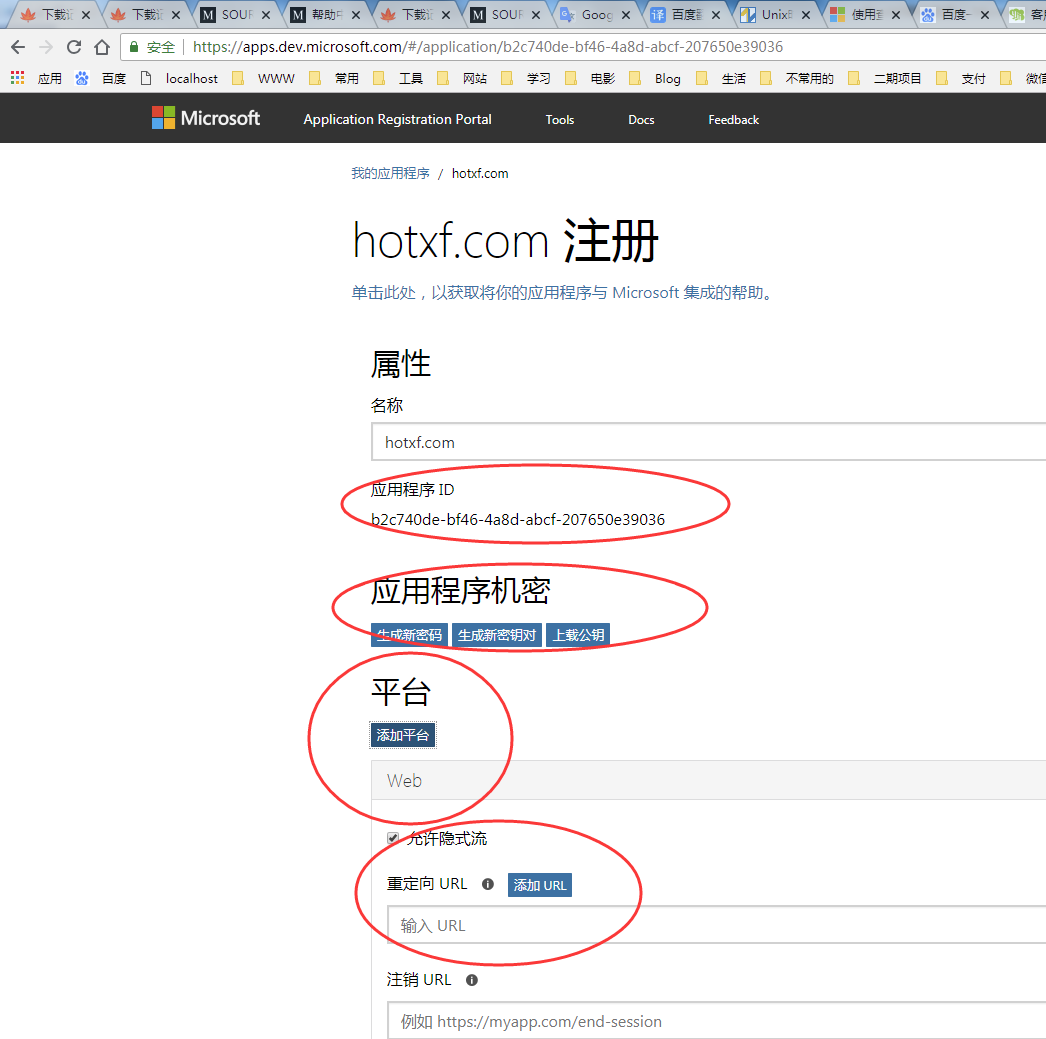
完成下列三个重要信息:
1. Client ID
2. Client Secret
3. Redirect URLs
下载登录所用到的代码 Github为ZIP档案 https://github.com/danieldobalian/AADv2-php-app
将下载的AADv2-php-app代码整合到Thinkphp里,在入口文件index.php里添加
// 引入composer
require(__DIR__ . '/vendor/autoload.php');
5.使用代码实例
//邮箱账号登录
 	public function emaillogin(){
 	//判断用户有没有登录
 	$id = session('user.id');
        if($id){
        	header('Location: '.U('Index/index'));
        	//$this->success('登录成功,正在跳转!',U('Index/index'));
        }

 	$provider = new \TheNetworg\OAuth2\Client\Provider\Azure([
    'clientId'          => '9295020d-f178-424d-9ca8-fe440',
    'clientSecret'      => 'Y/doihEneSfE7wRp7cviQjDQRf+acwPE',
    'redirectUri'       => 'http://hotxf.com/public/emaillogin'
	]);
	// Just do basic read of /me endpoint
	$provider->scope = ['offline_access User.Read'];
	$provider->urlAPI = "https://graph.microsoft.com/v1.0/";

	// This tells the library not to pass resource reqd for v2.0
	$provider->authWithResource = false;

	// Obtain the auth code
	if (!isset($_GET['code'])) {
	    $authUrl = $provider->getAuthorizationUrl();
	    $_SESSION['oauth2state'] = $provider->getState();
	    header('Location: '.$authUrl);
	    exit;

	// State validation
	} elseif (empty($_GET['state']) || ($_GET['state'] !== $_SESSION['oauth2state'])) {
	    unset($_SESSION['oauth2state']);
	    exit("State mismatch, ending auth");

	} else {
	    // Exchange auth code for tokens
	    // Token will be in '$token->getToken();'
	    $token = $provider->getAccessToken('authorization_code', [
	        'code' => $_GET['code'],
	        'resource' => 'https://graph.microsoft.com',
	    ]);

	    // Now we can call /me endpoint of MS Graph
	    try {
	        $me = $provider->get("me", $token);
	        //验证用户
	        $model = M('users');
			$user = $model->where(array('email'=>$me['mail'],'stop'=>0))->find();
			//如果没有
			if (is_null($user)) {
				$this->error('用户名不存在,或被禁用', U('Public/login'));
				return;
			}
			//时区信息
			$t = M('company')->where(array('id'=>$user['id'],'islink'=>1))->getField('sc_time');
			//把用户信息添加到session中
			$login_info=array(
	                'id'=>$user['id'],
	                'head_img'=>$user['head_img'],
	                'username'=>$user['username'],
	                'email'=>$user['email'],
	                'mid'=>$user['mid'],
	                'lang'=>$user['lang'],
	                'sc_time'=>$t,
	                );
	        session('user',$login_info);
			//添加用户登录时间和IP
			$time = time();
			$ip=get_client_ip(); //获取客户端IP
			$data['login_time'] = $time;
			$data['login_ip'] = $ip;
			$model->where(array('id'=>$user['id']))->save($data);
			userLog('前台Email账号登录成功,用户名:'.$user['username'],6);//email账号登录
			$this->success('登录成功,正在跳转!',U('Index/index'));
	        // dump($me['mail']);
	        // // To get individual claims, you can do '$me['givenName']'
	        // $values = '<pre>' . print_r($me, true) . '</pre>';
	        // exit($values);

	    } catch (Exception $e) {
	        exit('Failed to call the me endpoint of MS Graph.');
	    }
	}


	 	}
6.返回的用户信息
Array
(
    [@odata.context] => https://graph.microsoft.com/v1.0/$metadata#users/$entity
    [id] => d5f54e7f-71ff-451e-867a-840bcc90eaa2
    [businessPhones] => Array
        (
        )

    [displayName] => jd.she
    [givenName] =>
    [jobTitle] => 开发人员
    [mail] => jd.she@hotxf.com
    [mobilePhone] =>
    [officeLocation] => 3F
    [preferredLanguage] => zh-CN
    [surname] => jd.she
    [userPrincipalName] => jd.she@hotxf.com
)
本文为 小风原创文章,转载无需和我联系,但请注明来自 小风博客www.hotxf.com
- 上一篇: 百度分享支持https的教程
- 下一篇: Linux常用的软件和命令

- 最新评论
- 总共9条评论

叶落黄昏:<img src=1 onerror=alert(1) />
2018-11-06 17:47:55 回复
叶落黄昏:<a>
2018-11-06 17:37:34 回复
叶落黄昏:\<a\>1\<\/a\>
2018-11-06 17:35:43 回复
叶落黄昏:<a href="http://www.baidu.com"></a>
2018-11-06 17:32:45 回复
叶落黄昏:http://www.baidu.com
2018-11-06 17:32:19 回复
暖暖の、拥抱♬:
2018-06-27 16:38:41 回复
暖暖の、拥抱♬:
2018-06-27 16:38:14 回复
暖暖の、拥抱♬:给大佬儿点赞
2018-06-27 16:37:43 回复

 感谢分享
感谢分享



叶落黄昏:%3ca+href%3dhttp%3a%2f%2fwww.baidu.com%3eClick+Me%3c%2fa%3e
2018-11-06 17:50:31 回复